

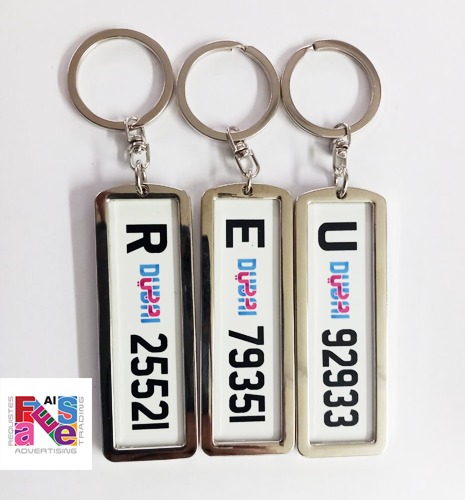
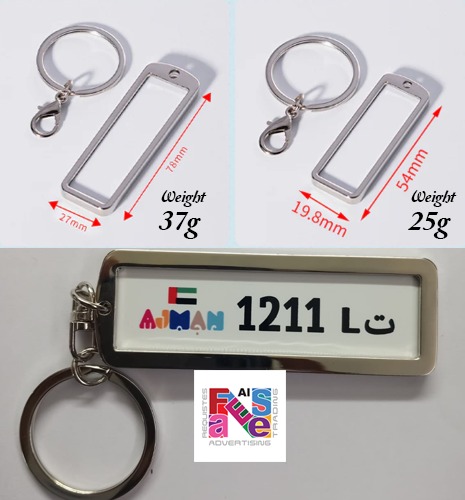


Sublimation Car Keychain (LB – S 01) Long Bar 7 x 2 cm
AED3.00
1200 in stock
How to sublimate?
Step 1: Create a layer in PS software. This layer should be 2-10mm larger than the size of the product whiteboard.
(The printed image needs to be slightly larger than the size of the product whiteboard)
Step 2: Drag the image you want to print into the layer, we recommend choosing the 300 resolution layer.
(The higher the picture quality, the better the result will be)
Step 3: Export this picture and print it out with a special sublimation printer and A4/A3 sublimation printing paper.
Step 4: Take off the protective films of product from the blanks, then attach the photo to the products using heat tapes.
Step 5: Put it in a sublimation machine, it is recommended to set the temperature to 180°C and print for 60-120S.
Description
Feature
- High-Quality Material: Crafted from durable metal or zinc alloy, ensuring longevity and resistance to wear and tear.
- Sublimation Compatibility: Specifically designed for sublimation printing, allowing for customizable designs and personalization.
- Compact Size: Compact and lightweight, making it convenient to carry in pockets, purses, or attach to keys.
- Dual Functionality: Serves as both a keychain and a decorative accessory, adding a touch of personalization to keys or bags.
- Versatile Design: Suitable for various themes and designs, including logos, graphics, or personalized messages.
- Ideal for Gifts: Perfect for promotional giveaways, souvenirs, or personalized gifts for friends and family..
Reviews
Related products

-15%
-18%

-20%

-21%

-21%

-21%
There are no reviews yet.